
Appearance
Jobs & Run History
Every time a template runs — ad hoc, scheduled, from a Quick Action, or triggered by Zabbix — it creates a job run: an execution record with its own status, parameters, and streamed output log.
Recent Runs
The Recent Runs tab lists the last 200 runs, most recent first:
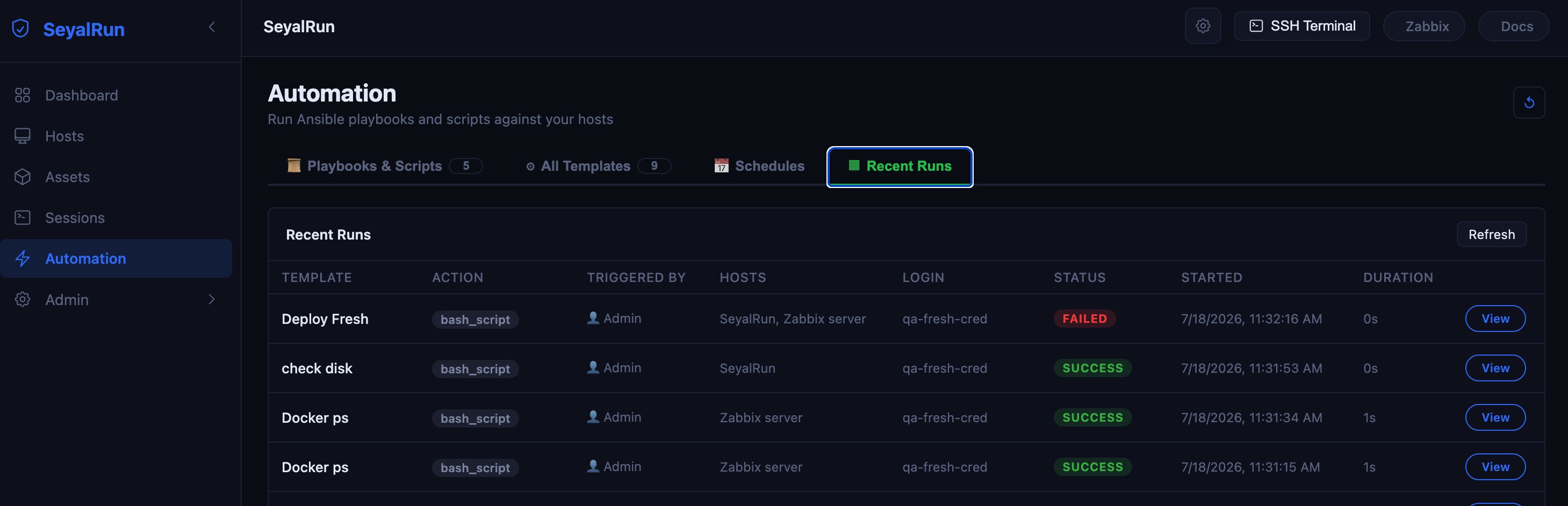
| Column | Meaning |
|---|---|
| Template | The job template this run came from (kept even if the template is later deleted). |
| Action | The executor type — ansible_playbook, bash_script, account_push, rotate_secret, disable_account, remove_account. |
| Triggered by | 👤 <username> for a manual run, 📅 Schedule for a cron-fired run, 🔔 Zabbix for a webhook-triggered run, 🖱 Manual for an internal/manual trigger. |
| Hosts | Resolved host names actually targeted by this run (truncated with a "+N" suffix for long lists; hover for the full list). |
| Login | The connection credential used — a name, "Default (push acct)", or "Per-host" when different hosts used different credentials. |
| Status | pending, running, success, failed, error, or cancelled. |
| Started / Duration | Wall-clock start time and elapsed time (live-updating while a run is still in progress). |
Click any row to open its detail page.
Job run detail & live log
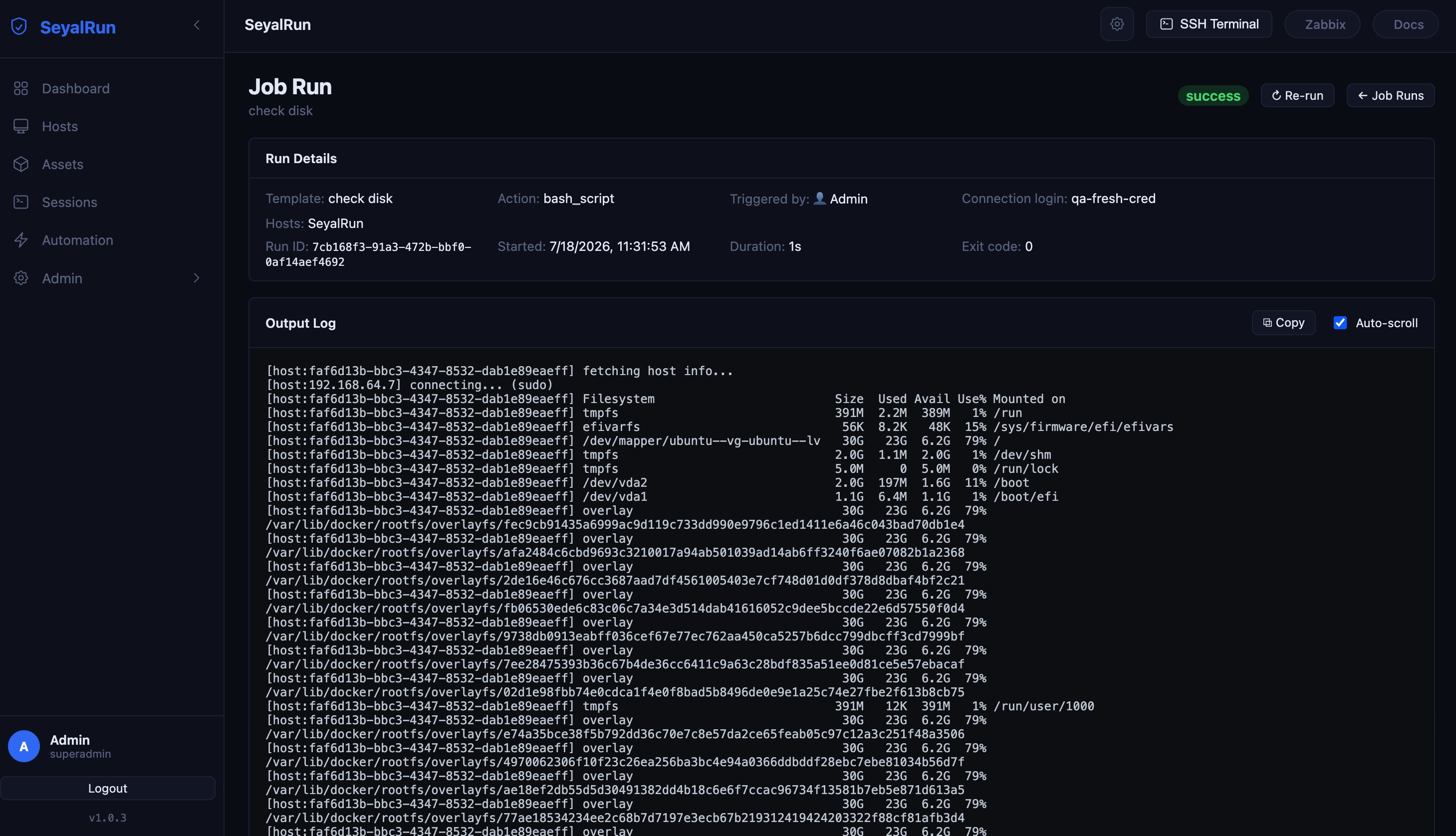
The Run Details card shows the template, action type, who/what triggered it, the connection login used, the subject account (for account-lifecycle runs), the resolved target hosts, the run ID, start time, duration, and — once finished — the exit code.
The Output Log panel streams output live over a WebSocket while the run is pending/running (a "● live…" indicator shows at the bottom), and falls back to the buffered log for finished runs. It includes:
- Copy — copies the full log text to your clipboard.
- Auto-scroll — toggle to stop the panel from jumping to the bottom as new lines arrive.
Reading the log
Output for multi-host bash-script and account-lifecycle runs is a single interleaved stream, with each line prefixed by the host it came from, e.g.:
[host:web-01] connecting...
[host:web-01] account push ok
[host:web-02] connecting... (sudo)
[host:web-02] account push failed (exit=1): sudo: a password is required
account_push complete: 1 ok, 1 failed
For Ansible playbook runs, the log is Ansible's own raw stdout (the default callback), covering every host in the play in Ansible's normal output format.
There is no separate structured per-host status view — despite result data existing in the API response shape, no executor currently populates it, so the log above (plus the run's single overall exit_code and, for account-lifecycle runs, a success/failure count in the final summary line) is the full picture of what happened on each host. If you need to know exactly which of several hosts failed, read the [host:…]-prefixed lines.
Cancelling a run
While a run is pending or running, its detail page shows a Cancel button in place of Re-run. Cancelling marks the run cancelled immediately and stops it from being treated as still-live by anything watching its log — it does not necessarily kill an in-flight remote command instantly, since bash/Ansible steps already dispatched to a host will finish on that host regardless.
Re-running a job
Once a run reaches a terminal status (success, failed, error, or cancelled), the Cancel button is replaced by ↻ Re-run. This dispatches a brand-new job run using the exact same template, resolved targets, and parameters (including the original credential selection) as the run you're looking at — handy for retrying a failed run after fixing the underlying issue, without reopening the Run modal and re-entering everything. It is a manual action, not an automatic retry policy (see Execution Options).
Run history retention
Job-run rows aren't pruned by MAX_OUTPUT_LINES (that only caps the number of log lines kept per run) — instead, a separate housekeeping job (orphan_job_logs_cleanup, admin-configurable cron under Admin → Housekeeping) periodically removes job-run rows whose parent template has since been deleted, keeping the Recent Runs table from growing unbounded over the life of the system.